Category: Gadgets (Page 11 of 27)

App of the Week: Real Racing 3

Developer: Firemonkeys

Compatible with: iPhone 4 and up (optimized for iPhone 5), iPod Touch 4th gen and up, iPad 2 and up, iPad Mini, Android devices

Requires: iOS 4.3 or later, Android 2.2 or later

Price: Free

Available here (for iOS) and here (for Android)

Nobody ever expects a gaming app to match their console counterparts in terms of looks and controls. Instead, mobile game developers have learned to focus on the benefits of the format and not the hindrances in order to craft brilliant titles separate, but equal to console games, and not dependent on graphics and the like.

“Real Racing 3” has a different approach. It says screw all that.

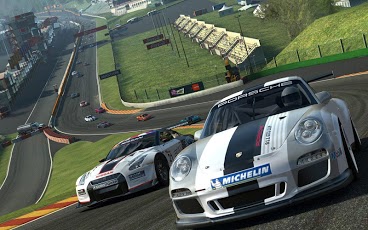
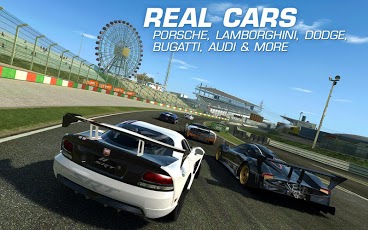
First the obvious. “Real Racing 3” is a beautiful game that truly offers console quality graphics, and doesn’t just use it as a tagline. From the cars to the courses, everything is immaculately designed and loses no wow factor even at high speeds. There’s still noteworthy competitors, but I truly believe this is the best looking gaming app yet. You’ll never stop being impressed with this game’s looks.
unnamed

But there’s more than just looks to “Real Racing 3,” as its controls are as pristine as that shiny coat of graphical paint. Acceleration is handled automatically, tilting your phone takes care of turning (and actually works, though a touch option is available), and everything from traction control to braking can be computer assisted (the level of which it helps is adjustable). Overall control is nice and tight, and I never once had to question if a bad manuever was the game’s fault or my own (mostly because I suck).

Furthermore the game’s AI is very, very impressive, and is aided by a new multiplayer concept called Time Shifted Multiplayer, which fills each race with AI versions of your friends and other racers around the world while online, meaning you can essentially still race your friends even offline as they can create ghosts of their laps that imitate their habits. However you choose your opponents though, the competition is fierce and fair.

Put all those features together, and the one limit that mobile gaming supposedly had (that it couldn’t match consoles in certain aspects), seemingly no longer applies, meaning that in all technical regards, “Real Racing 3” is the most notable gaming app in some time.

Otherwise, you’ve got your basic, though well executed, realistic racing game. There is a variety of races and challenges (900 events altogether), a nice selection of 40+ cars, real life racetracks, and in general enough to keep you busy for some time trying to beat and see everything available, and even more time afterwards trying to best your efforts.

The only other notable aspect is the freemium model of the game, as “Real Racing 3” is free, but for a price.
unnamed (1)

Like many other gaming apps, in-app purchases are available and highly pushed by the design. See the currency in “Real Racing 3” is handled by both funds and coins. Funds are used for buying parts, cars, and the usual and are earned through career progression, while coins are used for other enhancements and are earned by leveling up. Where the dark side of this design emerges in the repair and maintenance system, as you’ll be constantly repairing and maintaining your car’s basic features such as the engine, tires, and oil and using funds to do it. However, it can take several minutes (or even near an hour for multiple repairs) for the work to be done during which time the car is unusable.

This is where coins come in. For a few coins you can make the repair and tuning process instantaneous. The same applies to buying new cars and the like, as purchasing them still requires a waiting period before they can be used, which coins eliminate. The trouble is coins are hard to come by, and you’ll never have an abundance of them to keep up with the need. Instead you are encouraged to buy coins, or cars and upgrades alltogether, with real money to eliminate the tedium.

It’s not the worst pay model I’ve ever seen, but it’s pretty bad. Every non-racing activity is a grind, and it takes forever to complete or unlock even the basics, much less the high end stuff due to how money and time is used. You can buy more coins through in-app purchases if you’re desperate, but you can never eliminate the waiting feature, and I really wish that wasn’t the case as it is a huge detriment to the game. Patience is a necessity, and not a virtue, to get the most out of “Real Racing 3.”

While I sometimes wish then that the game cost a few dollars to eliminate that nuisance, the fact it is free means you can, and should,  at least try it. Remove the freemium system, you are left with the gold standard of pure racing games for mobile devices, and a benchmark to the capabilities of the medium as a whole, as well as a game that leaves all other competitors at the starting line, and takes home the trophy for app of the week.
App of the Week: MTA Subway Time

Developer:
Metropolitan Transit Authority

Compatible with:
iPhone 3GS and up

iPod Touch 3rd Gen and up

iPad

Requires:
iOS 5.0 or later

Price:

Free

Available here

My app this week is really only for residents of NYC. Everyone else, please feel free to proceed to the nearest sexy lady picture you find on this site.

Are they all gone?

Good.

So you know how annoying it is trying to catch your subway train on time right? Even though they stick to a supposed schedule (unless it’s the C train, the slacker of the transit system) sometimes your morning bagel takes a little longer to toast, or you have an unexpected stop and chat, or it’s raining and you debated for too long to call in or not, or maybe (as you told your boss) the train truly was running late, and your morning is now officially in peril.

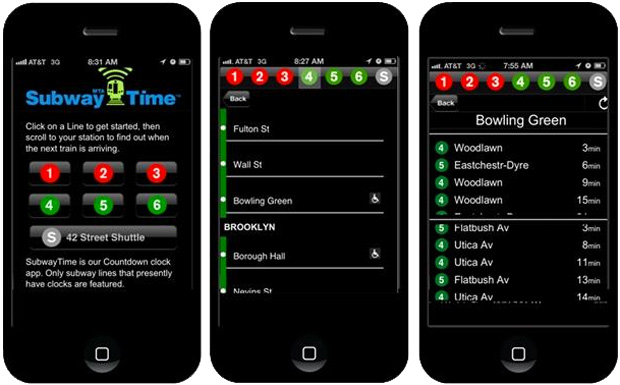
It happens far too often, and even though the MTA has updated platforms with arrival estimates, and support a host of apps to help, it wasn’t until the recently released MTA Subway Time app, that straphangers now have the ability to get real time train schedules.

The app currently supports 7 lines (1-6 and the 43nd S), and provides updated arrival times of the major lines as they occur. The arrival times include trains running in both all directions, and has data for both arriving and upcoming trains. Along with that, you also get the usual train routes, work updates, and all other information you would need in actually organizing your commute.

It’s not the world’s prettiest app, and is very basic in its current stage, but should still be immediately downloaded by any commuters of those lines, and really by all straphangers in anticipation of additional lines being added. Never before have commuters had this kind of accurate information available to them at any time, and the only reason it doesn’t feel more impressive is because it seems like something that should have been done long ago.

You can’t overstate how welcome this app is, and as the MTA chairman Joseph Lhota described it, represents a “day that generations of dreamers and futurists have waited for”. While I wish the app could give false updates to my boss that are more in line with my current, personal schedule, this miracle program arrives right in time to be named by app of the week.

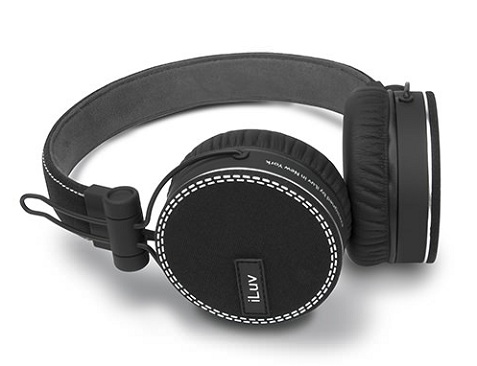
ReF over ear headphones from iLuv

We tried out these stylish new ReF headphones from iLuv and were very impressed. We love the styling and the white stitching, and along with the black version picture above the headphones also come in red, white and blue. Check out their website for a look at the other colors. If you’re looking for a last-minute holiday gift you can’t go wrong with these headphones. The styling make these headphones a great option for anyone, as they’ll fit into an urban setting or even a more professional setting with the slick but classy design.

While styling is important, we’re happy to report that the sound quality is excellent and the headphones are very comfortable. Other impressive features include the braided fabric 1.2 meter cord, Titanium diaphragm for mega-bass and precise treble, in-line remote with play/pause, volume, and track change controls and built-in mic with hands-free. The earphones are also collapsible for ultra-portability.

SLAPPA delivers for photographers with the M.A.S.K. DSLR backpack

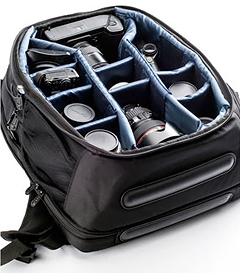
As a working photographer who often needs to lug a ton of equipment to my shoots, I was immediately intrigued when I heard about the new DSLR/laptop backpack from our friends at SLAPPA. We haven’t been shy about our love of SLAPPA equipment over the years, in large part because the quality of their gear is hard to beat. This MASK DSLR backpack is no different, with its water-resistant 1680D ballistic nylon outer shell and cushioned interior offering all sorts of protection for the contents inside. And I mean ALL the contents.

As with most SLAPPA bags, you may have a hard time filling all the available space in this backpack, with pockets seemingly on top of pockets inside of just about every nook and cranny of the bag. Inside, the padded divider insert allows for storage of a full collection of lenses and bodies for any pro or amateur photographer, and you can configure that section of the bag to fit your needs. The face of the bag features a pocket designed to give you instant access to your DSLR camera body and up to a 10” lens, and other flaps on the front are perfect for memory cards, spare batteries and other supplies. To top it off, there’s a dedicated pocket in the back of the bag for your 17” laptop and all the cords and chargers you need.

The only downside with this bag is the size which, when fully loaded, makes it more of a travel bag than something you’d carry with you on-site during a shoot, and the divider section is tough to access without completely unzipping the face of the bag. We’d also like to see a locking mechanism for the zippers so you can secure your equipment, but you won’t find many camera backpacks that can match the M.A.S.K.’s versatility and sheer capacity. If you need to get all of your photography gear from Point A to Point B, this is the bag for you. Stylish and comfortable, SLAPPA delivers yet again with this roomy and reliable DSLR/laptop backpack.

App of the Week – GTA: Vice City

Developer:
Rockstar Games

Compatible with:
iPhone 3GS and up (optimized for iPhone 5)

iPod Touch 3rd gen and up

iPad

Android Systems

Requires:
iOS 4.3 or later

Price:

$4.99

Available here (for iOS)

*Temporarily unavailable for Android

I was only a child of the 80’s in the strictest of technical senses, so I don’t share the same nostalgia for the decade that some do. However, it’s still entertaining to look at the 80’s objectively as you wonder what the collective masses of Americana were thinking, and if the mounds of cocaine being passed around enhanced the bad hairstyles and pastel color patterns, or merely numbed the pain of them.

I do however have a fond recollection of the growing up with the “GTA” series in my teenage years, and among those games, I have the fondest memories concerning the 80s influenced “GTA: Vice City”. Hot off the heels of the groundbreaking “GTA: III”, “Vice City” did many of the same things as its predecessor, but added more weapons, missions, characters, rampage options, in-jokes, cars, and everything else that makes the GTA series what it is. In fact, many fans still consider “Vice City” to be the peak of the series to this day.

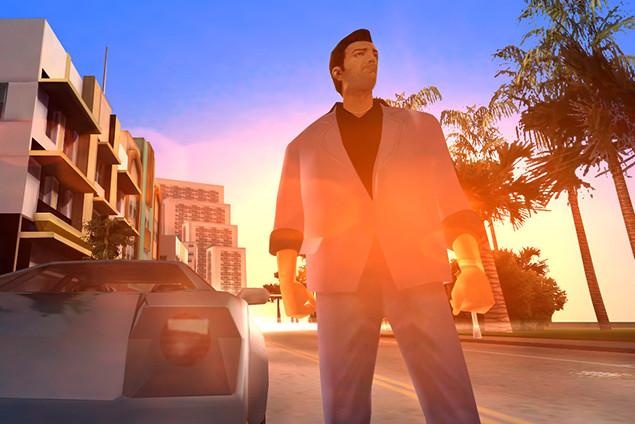
And now it comes to iOS and Android systems courtesy of Rockstar, to celebrate the 10 year anniversary of the game’s release. The conversion carries all of the usual aspects such as enhanced graphics (which look phenomenal on the iPad), custom radio station option (always welcome),and re-worked touch controls (which are always hit and miss for the GTA mobile series, but are serviceable). Other than that it is more or less the same game.

Which is exactly why it’s here. After working out the kinks from the 3D conversion in “GTA:III”, but before becoming burdened with the RPG elements of “San Andreas” or the misguided attempts at realism with “GTA:IV”, “Vice City” ran with its chance to perfect the “GTA” formula, and never looked back. It’s story is still the tightest in all of the series, the voice acting is also among the best (featuring Ray Liotta’s best performance of the last decade), the soundtrack is a hit on all stations, missions are creative without becoming burdensome, the vehicle selection (which included motorcycles and helicopters) is top notch, the weapon variety is fun, the property buying system is inspired, and the use of the over the top 80s with the over the top “GTA” series is a match made in heaven.

Of course you still get the usual “GTA” brand of mayhem, which regardless of the game in the series, is always entertaining. The touch controls will always keep the mobile versions from becoming the definitive version of the games, but they’re about the only thing that isn’t better than the original. One quick note though is that the Android version is having some technical difficulties at the moment and isn’t currently available for download. However, once it is, this is a strong recommendation for all platforms, and a must buy for iPads.

Eventually you can see “Scarface” too many times, listen to Thriller only so much, and don your Don Johnson jacket for the final time while still getting away with it being considered ironic. In those moments, you need an 80’s fix that will never go out of style, and “GTA: Vice City” is just that, making it the app of the week.

« Older posts Newer posts »

© 2026 Bullz-Eye Blog

Theme by Anders NorenUp ↑