A bag for every situation. That may not be Slappa’s official slogan, but it could be. We’ve reviewed a slew of Slappa products over the years, most recently the 18” Kiken shoulder bag and the M.A.S.K. custom build backpack. Like all of Slappa’s gear, both the Kiken and M.A.S.K. offer loads of space, but while the Kiken works best for daily commutes and business travel, the M.A.S.K. is a customizable backpack perfect for overnighters and weekend trips. Slappa’s newest bags, the Kampus and Stovepipe duffle-style laptop backpacks, serve a more utilitarian purpose: to get as much of your gear as possible from Point A to Point B. Fortunately, with bottomless main storage areas and padded laptop compartments, Point B can be any number of destinations, from a long weekend with your buddies or a getaway with your girl to your Economics class across campus before heading to the gym.
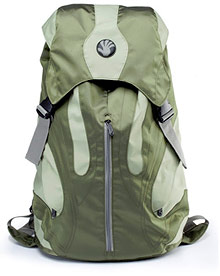 Both backpacks are super lightweight and feature a 3.5 gallon duffle-style main compartment, a dedicated .25” super-cush padded laptop compartment (available for 16” or 18” laptops), and a pair of decently sized inner pockets perfect for gadgets, school/office supplies or any other handheld items. The Kampus, however, sets itself apart with its outer pockets and overall design. The khaki version we reviewed is a great looking bag, which is precisely what we’ve come to expect from Slappa, and the two other color choices look cool as well. Two large and seamless pockets stretch across either side of the backpack while a third vertical pocket bisects the front of the bag. All three pockets are deep but, as I learned when packing for a recent camping trip, they unfortunately didn’t offer as much usable space as I’d hoped once I stuffed the inside of the bag full of clothes, toiletries and my laptop. The mesh pocket on the inside of the top flap makes for one more useful storage area, although that too is somewhat limited depending on how full the main compartment is.
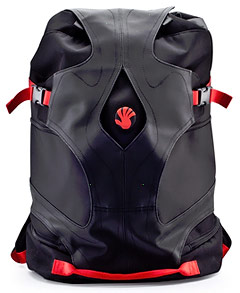 The Stovepipe is fundamentally the same bag but with a different skin. The three deep pockets from the Kampus are replaced with four smaller pockets on the outside of the Stovepipe. Unfortunately, none of the four pockets offer much space at all. In fact, we’d rather have just two deep side pockets that go all the way to the bottom of the bag than the four shallow pockets stacked in pairs on each side. The bottom pockets in particular seem almost pointless – maybe for pens and pencils, a couple jump drives and pocket change, but not much else. We also weren’t too keen on the front “jacket-flap,” which folds down and hangs off the front of the bag when it’s open, but design elements like that typically are just a matter of taste.
Slappa stayed true to the duffle bag concept with their Kampus and Stovepipe backpacks by offering tons of packable space in the main compartment but precious little additional pocket space anywhere else. That’s not necessarily a bad thing, but it does limit each bag’s usefulness since the vast majority of the stuff you cram in there will be in the same area, making it a bit of a challenge to find what you’re looking for, especially if you have clothes and other gear all mixed together. These aren’t bags you’re going to live out of for a weekend – I pulled all my clothes out during my camping trip so I didn’t have to dig through the bag every time I wanted to change my shirt – but they are bags that will get you and your stuff to your weekend. They also pack up great and are easy to sling across your back, even when they’re packed to the gills, which makes them perfect for hikers and bikers, particularly those who need to travel with their laptops.
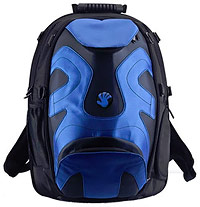 If you prefer backpacks to duffles, Slappa recently introduced two new faces for their M.A.S.K. custom build backpack. We first tested the M.A.S.K. a couple years ago with the High Five and KOA custom faces, and now Slappa has two more options: the Transit and Koop faces. Each is built similarly, with a foldout pocket at the bottom and a deeper, more useful pocket at the top, but the Koop is more of an eye-catcher with its electric blue styling while the Transit features a third pocket in the front, sitting stealthily behind two flaps. This extra pocket isn’t big enough to hold much more than a passport, wallet and plane ticket, but that alone makes it useful. In fact, the M.A.S.K. together with the Transit makes for one super useful carryon bag with easy accessibility. Yet another Slappa bag for another situation.


