Author: Matt Byrd (Page 15 of 19)

App of the Week: Drive

Developer:
Create Digital Media

Compatible with:
iPhone 3GS or up (optimized for iPhone 5)

iPod touch 3rd gen or up

iPad

Requires:
iOS 5.1

Price:
$0.99

Available here

Don’t use your phone while driving.

From nationwide campaigns to motherly warnings, we’ve had that simple message drilled into our heads for as long as we’ve had cell phones. Most people know the dangers, and most agree with the idea in principle, but unlike other driving safe philosophies, like “don’t drink and drive” or “wear your seatbelt,” the idea of putting down your smartphone while driving is not catching on any time soon. You see it all of the time, and probably have been guilty of it yourself a few times, yet as much as it seems like common sense, it’s pretty obvious people are not in a hurry to stop doing it in mass.

Developers Create Digital Media seems to realize this and have created a compromise of sorts. If you are going to use your phone while driving, then at least limit yourself. They’ve removed your game apps, Facebook, keyboard, and Twitter, and have designed the app Drive, which trims your smartphone down to four main functions, all grouped together and handled by a beautifully minimalist design.

The functions are call, music, text, and map. Coupled with the large font, brightly colored ways they are displayed, the actual methods to using these features are also pleasantly simple and often require only bold gestures and swipes.

For instance, the music app allows you to change songs by horizontal swipes, and change the volume with two finger vertical motions (you can also play the music randomly via a shuffle playlist). Texts and calls use simple scroll and tap methods for going through your contacts, and for texts you are able to program general important statements for quick sends. The map features is maybe the least developed of the bunch, but it does provide integration with Apple Maps as well as standard directional functions and a nice, easy to view on the fly general map in tune with your current location.

The developers of the app are promising to keep developing all of its functions, with the map feature seeming to be a main point of emphasis with these updates. Even in its early stage though, Drive provides one of the more complete driver friendly apps I’ve ever seen as it successfully allows you to use the most important abilities of your phone without severely impairing your ability to drive. It’s an incredibly intelligent app, that with enough improvements you could evolve into a standard mode for all out of the box smartphones as it presents a realistic idea for handling the using your phone while driving problem, and also provides and alternative, simpler phone use option for any other times when your ability to use your phone to its full extent is hindered.

If you’re guilty of using your iPhone or, even worse, iPad, while driving then you owe it to yourself, and honestly other drivers, to give Drive a shot. Not only is it sleek, intuitive, and incredibly user friendly, it’s also my app of the week.

MOGA Mobile Gaming System Review: Controlling the Future of Android Gaming

You might know video game accessory makers PowerA as a novelty company of sorts. A quick scan of their website will reveal that they sell everything from Yoshi backpacks to sweet Batarang styled controllers. They’re obviously a company having fun with what they do.

You may, then, try to write off their latest creation, the MOGA mobile gaming console, an Android system game controller, as a novelty as well. After all, the entire point of having a touch-based system is the simplicity of the touch-based controls eliminating the need for traditional controllers. Understandably, it is easy to ignore the idea of buying an accessory for controlling touchscreen games.

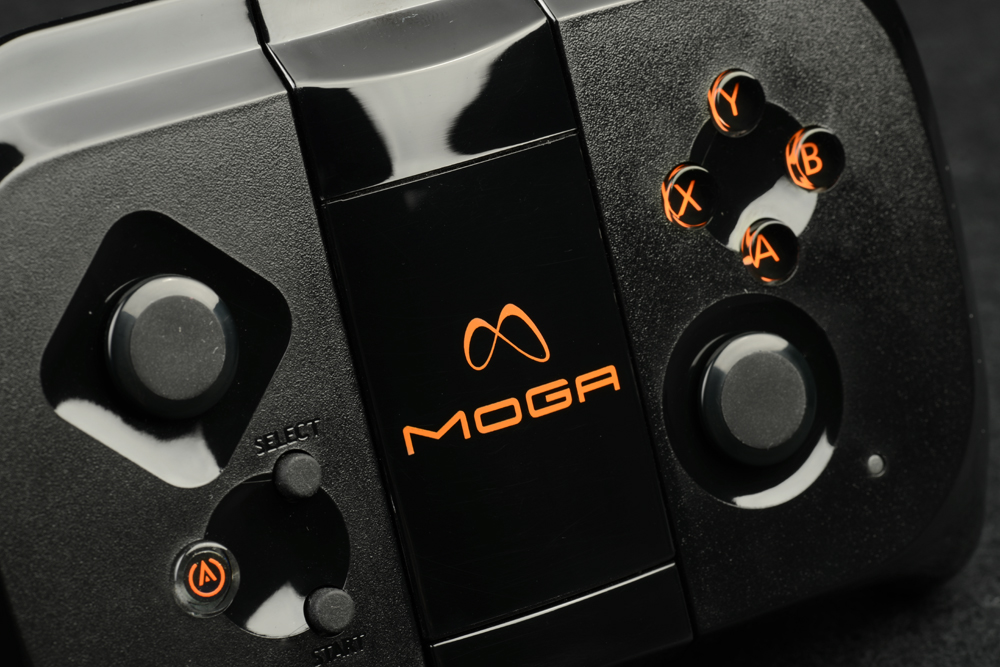
Doing so, however, would be doing yourself a tremendous disservice. Compatible with over 40 titles and Android systems 2.3 and up, the MOGA is a battery-operated, bluetooth-enabled controller that essentially turns your touchscreen phone into more of a traditional handheld gaming device. It even works with tablets, remotely, by using a sync button. The reason it succeeds is entirely due to the design of the controller, which is perfectly sized to take into account both your hands and the size of the phone. The button layout is reminiscent of an Xbox controller, and immediately feels comfortable with the real highlights being the “nub” like joysticks that barely protrude from the controller and never intrude on your game experience, the responsive and well placed “trigger” shoulder buttons, and a nice rubber lining along the side of the unit, providing a firm grip.

Even better than the design of the controller is the fact that it really does work. I never once experienced a moment of lag or unresponsiveness while playing, which is quite impressive considering that these games weren’t designed with this controller in mind. The compatible games so far don’t necessarily use every button on the remote at all times, but the ones that they do work in some way to enhance each game significantly, whether it be true range of movement in the FPS “N.O.V.A. 3” thanks to the joysticks, or more accurate QB controls in “Madden 2013” on behalf of the face buttons.

It’s pretty clear that the list of available titles for the MOGA is far from random, and instead are carefully hand picked titles that don’t work on touchscreen gaming alone without some sacrifice, whether minor or seriously detrimental, going along with it. Rather than think of the MOGA as a superfluous touchscreen accessory, you should instead consider it a savior of a variety of genres and titles that at this time simply do not work well on a touchscreen, even if the games themselves are exceptional.

A great example would be the phenomenal “Sonic CD.” Never having had the chance to experience this classic during its release, using the MOGA I found myself incredibly addicted to it. Curious, I switched to the touchscreen controls and found it purely unplayable to the point where I questioned the integrity of releasing it in such a format. That’s one example, but it holds true for many of the compatible titles so far. The MOGA significantly enhances the value of the games it supports.

PowerA is already hyping new titles and developers that are set to jump onto the MOGA, and I hope it happens soon. The very idea of the controller opens up a missing link of sorts between mobile gaming and the rest of the field, and the actual functionality of the device immediately eliminates any doubts you might have regarding if the concept can truly work. I wish there was a greater range of motion on the actual dock (which can be set to three positions), but it does work for everyday use, as well as more unconventional playing positions like lying down.

Whether or not the MOGA justifies its $49.99 price tag is entirely dependent on a number of factors, such as how much you game on your mobile device, how many of the compatible games you play, and how much faith you have in a variety of developers continuing to support the device. Considering its ingenious design, though, in a perfect world we would see enough continued support for this device to call buying it now an investment. As it stands, the MOGA adds some kind of improvement to every game it works with and is easily one of the best all-around gaming accessories I’ve used this year.

App of the Week: Striiv

Developer:
Striiv Inc.

Compatible with:
iPhone 3GS or up

iPod 3rd gen or up

iPad

Requires:
iOS 5.0 or up

Price:
Free

Available here


As saloon old timer number 3 said in “Back to the Future Part 3”:

The sad truth is, running is simultaneously one of the most beneficial activities you can embark on, and one of the most unappealing. Whether it be the exhaustion factor, the sweaty clothes, the fact you probably have one of those “ridiculous” running styles you criticize strangers for having, or the dreaded chaffed thighs, just about everyone has a reason for not wanting to run, which is why starting the activity is often referred to as finding your motivation.

Now your motivation may come in the form of the app Striiv. Once a $99.95 smart pedometer, Striiv is now a free app that provides a lot of the usual pedometer functions like tracking calories burnt, miles ran, steps taken, etc. Where Striiv makes it’s name, though, is in how it enhances the running experience for its users.

The most basic element of this is the available social functions. It’s always more fun to run with someone else and, using Faceook, you can link up with your friends who also have the app in an ongoing stat comparison competition. Even better is the challenge feature which carries a number of pre-determined goals like walking a certain amount, time challenges, or specialty goals like ascending  the statue of liberty (or the equivalent number of steps). Completing these challenges give you trophies, making them similar to Xbox 360 achievements.

Even more similar to gaming is the actual game included with Striiv. Called MyLand, every step you take and every milestone you reach, earns you points to spend on stuff to fill your virtual world with ranging from foliage to buildings. While not as fun as say “SimCity” it’s a surprisingly deep and entertaining way to reward you for your progress.

Really the whole point of this app is to help make running fun, and it surprisingly succeeds at that. It may not help you to get started running by itself, but if you’ve already decided to start then this is one of the best apps available for helping you to keep going. The challenges are well placed and varied, the MyLand feature is addictive and implemented nicely, and best of all the basic pedometer features have all of the stats, graphs, and counters you could ask for to go along with these enhanced entertainment modes.

It’s not easy to make running enjoyable, but Striiv makes some incredible progress in achieving just that. Whether it be by providing you a constant group of running companions, or that little extra incentive to go that extra mile, Striiv’s abilities to enhance your running experience was almost worth it as a standalone $100 pedometer. As a free iPhone app, it runs away with my app of the week.


App of the Week: Devil’s Attorney

Developer:
Senri AB

Compatible with:
Android Devices

Requires:
Android 2.3 or up

Price:
$3.00

Available here

“If there were no bad people, there would be no good lawyers.” – Charles Dickens

You may find this quote close to fictional lawyer Max McMann’s heart, if not on a plaque somewhere in his seedy office or written for keepsake to tuck away in his cheap suit. He’s the start of the new app “Devil’s Attorney”, and he is not necessarily a bad man, just a damn good lawyer.

“Devil’s Attorney” is an app similar in concept to the successful DS lawyer series, “Phoenix Wright”. The twist here is that you don’t play a crusader of justice, so much as a chaser of ambulances, as it’s pretty clear that McMann became a lawyer for the specific purpose of making a lot of money, as his clients are almost exclusively of the guilty persuasion (though he would strongly advise they do not make a similar plea in court).

The game is made up of over 50 cases where the player, as Max, has to out maneuver the prosecution and their witnesses. The court scenes are broken down into rounds, and you are given a certain amount of action points to spend on maneuvers like Cross Examination, Epic Speech, Mesmerize, and of course the always useful Tamper With Evidence. You’re trying to use your actions to “defeat” witnesses, and the evidence itself, by draining their hit points (call it “character assassination”) and taking them out of the game, making this very much like a traditional RPG. Once you run out of action points, your round is over and you have to weather the prosecutions attacks.

Appropriately, it’s not so much about the case as it is about the tactics.  You have to manage your action points well as you often either focus your efforts on one witness or evidence piece at a time, or spread the damage throughout. Win a case, and you’re rewarded with cold hard cash, which can be used to purchase new suits or furniture for your apartment, which in turn grants new abilities or enhancements to your current ones. So you could, for instance, swagger into your next case wearing a feathered pimp hat, zebra suit and monocle, while wielding a hammer for extra evidence tampering abilities.

The key to the entire game is its humor, which is strangely (yet successfully) rooted pretty firmly in 80’s pop culture. The actual court room mechanics works okay, but if it wasn’t for the insane amount of fun this game is having with everything from the bizarre cases, to the gut busting humorous dialogue, and the gaudy swag that doubles as upgrades, this might be a completely forgettable game. Instead it is that aspect that drives you to keep playing (and enjoying this game) until the final case is closed. It is a rare feature in a video game where you get to play the bad guy, and it is truly a welcome change of pace to be able to speak on behalf of some of the worst criminals imaginable all in the pursuit of the mighty dollar.

The constant amount of artistic style and comedy on display in “Devil’s Attorney” is a true joy. It’s a morally objectionable game that isn’t trying to be offensive, and instead milks a demented concept for all the black humor and enjoyment it is worth. I do wish the game were a bit longer, but what’s here is solid gold.

As your attorney I advise you to buy this game right away as well as check out the incredible 80’s style intro below. Afterwards, I don’t think I’ll hear any objections to this being the app of the week.

App of the Week: Super Monsters Ate My Condo

Developer:
PikPok

Compatible with:
iPhone (3GS Minimum)

iPod Touch (3rd Gen. Minimum)

iPad

Requires:
iOS 4.3 or later

Price:
$0.99

Available here

Wild man, just wild.

It’s about the only way to describe the original “Monsters Ate My Condo” released by Adult Swim and PikPok. It was a fury of colors, crazy designs, and lightning quick reaction times that was impossible to not get swept up in, and more than worth its $1.00 asking price. Now it’s back in the form of an appropriately titled sequel, “Super Monsters Ate My Condo”.

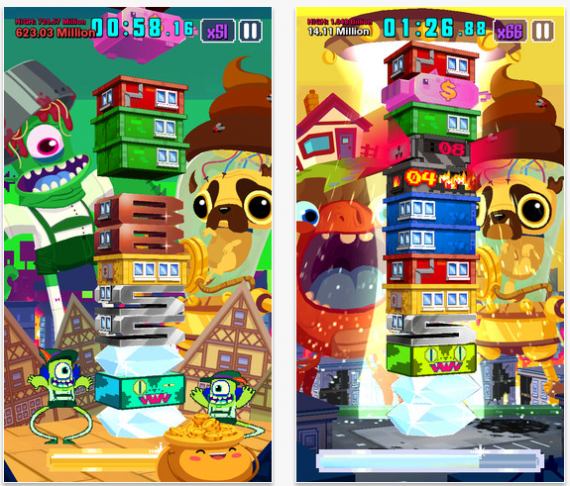
The basic idea behind the game is that you have to build a towering condo made up of multi-colored pieces, and keep it from toppling. To do so, you have to match three of the same colored leveled pieces to create a stronger bronze level. Three combined bronzes make a silver, three silvers a gold, and three golds a diamond.

Of course, to match level colors, you’ll have to discard those in the way. This is where the monsters come in. The monsters are intent on destroying your already shaking condo, and the only way to appease them is to swipe levels that match the monsters color their way for their consumption, and to get them out of your way. If you swipe too many levels of the wrong color, or neglect to feed one of a levels two monsters for too long, they get to smashing. Also when you match three of a same color, the monster on the level that shares that color goes away and is replaced by another.

That’s the general idea of the gameplay, but it only gets nuts from there. Because there’s also things like special blocks that can aid a player if used correctly, or cause some real damage if they aren’t disposed of quickly. The monsters also carry different super powers which aid the player and are activated by feeding the monsters special combo floors (the stronger the floor, the more effective the power). The trade off is you lose a strong level, but the payoff yields attributes like more time on the clock or preventing harmful blocks from falling while in use, so it’s almost always worth it.

New to the sequel is the game’s increased (and addictive) focus on objectives. You’re given three goals on the outset of every level, and completing all three unlocks a new set of objectives and also new elements within the game (such as special level blocks). You also unlock booster abilities and coins as you go along. The boosters provide a wide range of in game aids, while draining coins upon each use. In a nice little nod to ‘Team Fortress 2,” the coins can also be used to purchase a variety of hats for the monsters, which create permanent ability boosters, but cost way more. Also worth noting is the absence of the original game’s endless play mode, and instead the only game option is a timed two minute run.

To play “Super Monsters Ate My Condo” is to love it. You’ve played this basic type of game a million times before, and “Super Monsters” knows it. That’s why it goes out of its way to make sure that every intangible element of the game that isn’t just matching similar colored blocks is exceedingly well done. Level and character drawings, sound design, and the enticing mission based system all make “Super Monsters” already addictive gameplay become irresistible.

It’s not easy to play this game for just two minutes at a time, as you constantly challenge yourself to meet your own personal objectives, or those of the game. The core concept would be addictive enough on its own, but the way you are constantly rewarded for  diving into it deeper makes it impossible to put down. You’ll start to measure your life in two minute intervals, and catch yourself with the game’s images of dancing monsters in lederhosen and endless streams of blocks clouding your thoughts when you try to step away from it.

I not only don’t mind that “Super Monsters” continue to eat my condos, but gladly let them eat my dollar as well. This is the “One More Game” effect at its best, and makes for a clear app of the week.

« Older posts Newer posts »

© 2026 Bullz-Eye Blog

Theme by Anders NorenUp ↑