Author: Matt Byrd (Page 9 of 19)

App of the Week: Star Command

Developer: Star Command LLC.

Compatible with: iPhone 3GS and up (optimized for iPhone 5), iPod touch 3rd gen and up, iPad

Requires: iOS 4.3 or later

Price: $2.99

Available here

Captain’s Log Stardate 90946.8

After years in development following a successful Kickstarter campaign, “Star Command” is now available for the app store, and provides a universe spanning strategy title, that offers the chance to chart the unknown and boldly go where no game has gone before.

Well…ok that’s an exaggeration.

In fact, “Star Command” has a lot in common with the PC indie hit “FTL,” right down to the Kickstarter origins, as both games task you with the same objective of traversing different galaxies and defeating some of the toughest scum in the galaxy through ship to ship battles, and onboard scuffles, all as captain of your very own space ship.

While the games may share a similar product description, where “Star Command” differs, and ultimately shines, is in the number of little things.
mzl.iquauvaj.320x480-75

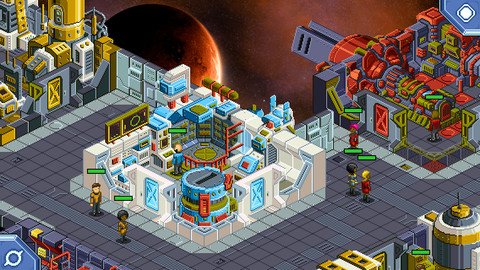
For instance, the graphics are exceptional. Whereas “FTL” was all about minimalism, “Star Command” looks similar to old PC games like “XCOM” or “Syndicate” and gets the most out of its perspective thanks to a bright and detailed style. The cutscenes are also straight out of a Lucasarts adventure game, and really drive home the humor, danger, and even frights of the game based on the current situation.

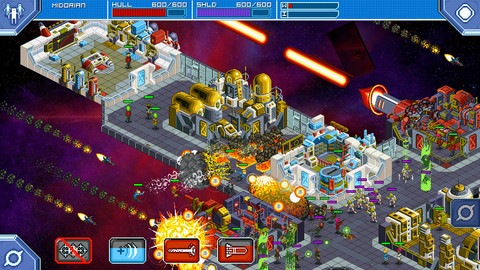
As for the gameplay, there is a lot of it. After you’ve customized your captain, you are now responsible for hiring a crew, and assigning them to three different job classes, as well as building and customizing your ships weapons and systems, which are all acquired by using tokens that are earned along the way. Once everything is eventually in place, the game mostly revolves around combat, for which you are responsible for the command of every single aspect of the ship. When it’s time to fire the plasma beams, that’s up to you. When a team needs to be organized to fend off a boarding party, that’s up to you. And when all hell is breaking loose and no hope seems to be available, it’s again down to you.

That last one is important, as things can get out of control very easily. This is not an easy game by any means, as “Star Command” requires your complete concentration, and the ability to multitask like a machine, if you are ever going to have a chance of surviving. Your survival is the key too, as once the captain goes down, the game is over.
mzl.uukjfeax.320x480-75

Don’t let the doom and gloom keep you away though, as even at its most frustrating “Star Command” is an ambitious and extremely entertaining title that does a great job at promoting an atmosphere where anything can happen at any turn. Exploring the universe truly feels like you’re doing just that, since the variety of enemies and scenarios present at each location rarely, if ever, repeats, making each new adventure feel like some lost episode of “Star Trek.”

In fact it’s probably no coincidence that this game is coming out so close to the new “Star Trek” movie, as if you are a fan of that series, or of anything sci-fi, this app is a beam down from the heavens. It’s a complex, yet accessible and rewarding, adventure that requires several levels of active and passive strategies. Every effort proves worth it though, as it all contributes to a title that lets you experience what it’s like to be at the helm of your own sci-fi ship.

“Star Command” is the perfect type of strategy game for your phone, and with any luck will be the start of a franchise that will live long and prosper. For now though, this game proudly serves as my app of the week.
App of the Week: Swype

Developer: Nuance Communications Inc.

Compatible with: Android devices

Requires: Android 2.2 and up

Price: $0.99

Available here

The keyboard of your mobile device is something you can’t even call a feature. It’s more of a given and, as such, you probably never really put much thought into it, or consideration into using any but the one your device came with.

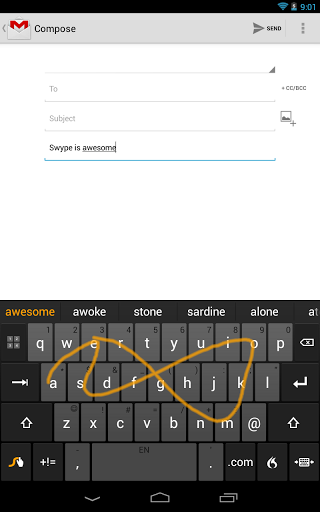
The developers of Swype seem to be aware of that mentality, and for years have been working on a keyboard alternative that would merit that very consideration. While they made their name initially (and literally) because of a trace to type featured dubbed Swype, that feature has since become standard for many android devices, and have forced the team at Swype to develop a product not dependent on a single feature, and worthy of the app’s long anticipated Google Play debut.

They’ve done it too. With the trace feature no longer its ace, Swype instead focuses its effort on making a keyboard that is not only faster than others (Swype was used to set a Guinness Book record for texting) but more accurate as well. While this is best exemplified in its abilities to do things like learn the type of language and lingo you use to offer better text prediction, its intelligent sentence editor, or how you can do things like change to a keypad style layout for numbers, it’s more of general design philosophy than anything that is exemplified by a single feature.

unnamed

That isn’t to say that Swype doesn’t have some flash though. Since being bought by Nuance Communications, Swype has incorporated that company’s Dragon Mobile Assistant feature, which is integrated into the keyboard and allows you to verbally dictate a message, or any input, with a kind of accuracy you really don’t see from other similar programs, and provides yet another reliable input feature for your buck. There’s even a planned feature which will incorporate the languages and unique dialects of any area you are in, and use them to further enhance the text prediction feature.

I’d be lying if I said Swype is a sexy or exciting app, or one that is easy to properly do justice to by describing it. It isn’t, and you can’t. What it is though is a monumental improvement to maybe the most essential of functions your mobile device is capable of, and at its must have introduction price of $0.99 (which unlocks it for your phone and tablet) is cheaper than other comparable apps like Swiftkey, yet doesn’t sacrifice an ounce of functionality in the process.

You may not often consider your keyboard and ways to make it better, but the developers of Swype have, and they’ve used that information to create a keyboard that is my app of the week.

App of the Week: Stealth Assassin

Developer: Erman Haskan

Compatible with: iPhone 3GS and up (optimized for iPhone 5), iPod touch 3rd gen and up, and iPad

Requires: iOS 4.3 or later

Price: $0.99

Available here

While I always try to find the newest possible apps to bring to this column, occasionally an app can be missed for a few weeks. Sometimes it can be a mystery how this happens, but in the case of “Stealth Assassin,” it seems oddly appropriate that it would exist unnoticed.

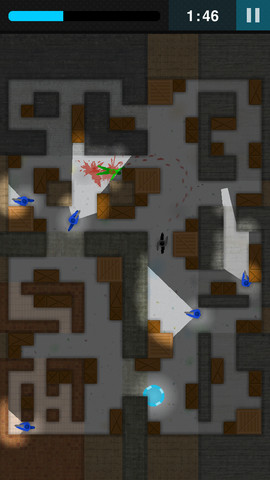
In “Stealth Assassin” you take the role of the titular stealth assassin, and navigate 100+ maze like levels in order to take out your wandering green man target and escape within a time limit. There to stop you are a squad of roaming blue guards, with flashlight aided cones of vision, who patrol around the target, and swarm upon and shoot you if you cross their path. To help turn the tides are your abilities of super speed and invisibility, which drain your re-filling power bar.

If “Stealth Assassin” sounds, and looks, simple in its graphics, concept, gameplay, and plot, that’s because it’s based on a flash game series known as “Ultimate Assassin,” and flash games aren’t typically known for triumphs in any of those things. What they are known for are oddly addictive experiences based on somewhat quirky concepts, accomplished in a way so that they serve equal doses of fun to those playing for a few minutes, or those who find themselves oddly hooked hours later.

mzl.czjobymi.320x480-75

“Stealth Assassin” retains that same experience in its transition to mobile. It’s got a little resemblance to stealth classics like “Metal Gear,” but oddly it reminds me more of a demented cross between “Pac-Man,” “Bomberman,” and “Hotline Miami.” At first navigating your way to the target and escaping is a simple, but satisfying, proposition, but the difficulty wastes no time in ramping up, and soon you’ll find every wit and reflex you have available working to complete the later stages. Doing so provides that perfect ratio of effort to satisfaction, that is only enhanced replay wise by the addition of achievements on each stage that tempt you to better your  best.

If there is a knock against “Stealth Assassin,” it’s  that the controls are touchy and take some serious mastering so they don’t interrupt your enjoyment. However, when you consider that this is a value title based around a very simple idea, there’s not much more you can knock “Stealth Assassin” for, as it gets the most out of its premise, and delivers a game that is worth considerably more than its asking price in terms of how often you’ll find yourself going to it when you have the free moment to do so.

Summing up “Stealth Assassin” is like describing the perfect real assassin. It exhibits no flash, and instead is quickly in and quickly out, leaving nothing but a job well done in its wake. For exhibiting the benefits of the professional execution of simplicity, “Stealth Assassin” is my app of the week.

App of the Week: Status Board

Developer: Panic Inc.

Compatible with: iPad

Requires: iOS 5.0 or later

Price: $9.99

Available here

I think that if someone from, say, 60 years in the past got the chance to visit the world of today, the most shocking thing might not be the technology available, but how we use it.

Think about the power of your iPad for instance. Its impressive abilities as a computer are only bested by its incredible mobility, creating a device that has the potential to access near infinite amounts of knowledge and complete an incalculable amount of tasks at any point in the world. Yet most people probably use it to watch Youtube, play “Fruit Ninja,” and check on the latest mock draft.

If that’s you, and you’ve been thinking of using your iPad for something more productive, consider the new Status Board app.

mzl.unkrvmov.480x480-75

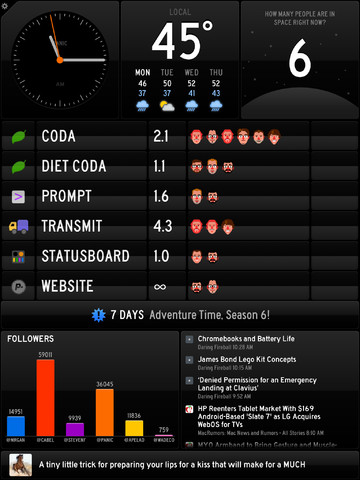
Status Board takes all of the data you commonly use, and organizes it all nicely onto a single screen format, until your iPad resembles one of those little data pads they used to carry around on “Star Trek.” The default data feeds include things like your e-mail, twitter, the weather, constantly updating headlines from your favorite sites, and more, but that is just the surface of what Status Board offers. The real value of this app comes from its deep customization options.

While this of course includes features like the ability to re-size and re-arrange every information panel, Status Board goes deeper with functions like the ability to upload almost any data type (allowing for custom charts and graphs), as well use the  built-in HTML programming feature to create nearly any type of panel you can think of. Already, people are coming up with some amazing custom uses for the device.

Status Board isn’t an app for everyone, and I honestly don’t know if I’d have a use for it myself. But for small business owners, website gurus, the hyper-productive, or really anyone in an office environment, it is invaluable. All of the information you could ever want is readily available to be viewed with a glance, or interacted with via a touch. It turns you iPad from potential workplace distraction, to ready source of constant knowledge for yourself and, if you choose to purchase the optional TV hookup feature, everyone else around you.

The current form of this app may not maximize its potential, but even “out of the box,” it instantly maximizes the professional potential of your iPad. A quick scan of the apps description should tell you right away if you have use for it or not, and even if that answer is no, you still have to respect the technical prowess it wields. It’s the kind of app Apple probably had in mind when building the app store, and with the right amount of developer and user support, could prove to be a valuable tool in every major office worldwide.

And yes, it will probably garner the approval of your theoretical time traveling ancestors. That alone secures it my app of the week.

Game Review: “Motocross Madness”

Available for
Xbox 360
Publisher
Microsoft

While not exactly an all-time classic, the original “Motocross Madness” games for the PC had a solid fanbase and are generally well remembered for their incredible crashes and speedy action. It was a pleasant surprise, then, to hear Microsoft would be reviving the series, only this time as an avatar-driven Xbox Live arcade title.

Arcade is the keyword here, because from the over the top announcer, to the over the top races, this “Motocross Madness” feels like it belongs in an old arcade cabinet, complete with motorbike controller. However, once you get past the tutorial level, which does a nice job of showcasing the high speeds, “SSX” style tricks, and the glorious return of those highlight reel crashes, you’ll likely be surprised to find that “Motocross Madness” differs greatly from those old arcade racers in how open it is.

In a race, for instance, you’ll find a plethora of shortcuts littered throughout each course, creating contests that limit the amount of course barriers and invisible walls, and instead encourage exploration in order to find the best way to tackle a lap. It’s nothing new, but except for a couple of instances where you get lost easily, it’s well done. Where the open course mentality really shines, though, is in the free ride mode, where you are granted a sizable map to collect coins and skulls, which can be used to unlock new items, and more importantly, plenty of room to pull off amazing jumps and tricks.

These open levels consist of three sections and are absolutely huge. Every area is littered with multiple insane jumps, as well as unique areas you’ll run across like amusement parks or castles which provide even more opportunities for creative havoc. My biggest problem with the mode, however, is that unless you are really, really obsessed with finding big jumps and exploring the areas or unlocking everything, there just isn’t much incentive to invest serious time in it, and the novelty can wear off quickly. I would have even settled for scaled down environments if they could have been loaded with more objectives, kind of like the old “Tony Hawk” games.

Continue reading »

« Older posts Newer posts »

© 2026 Bullz-Eye Blog

Theme by Anders NorenUp ↑